
Employee Guide: AI Notes Summarization
Perform includes an AI feature that helps you write stronger self-reviews. Here's a quick explanation of what it does, how to use it, and what to do if you have questions.
Skip to:
- What is AI Notes Summarization?
- How To Use
- What Happens To Your Data?
- Will AI write my review?
- What if I think my summary was inaccurate?
- Tips for making the most of it
- FAQ
What is AI Notes Summarization?
Throughout the year, notes and feedback about your performance are collected in Perform — from peers, your manager, and your own self-assessments. When it's time for your self-review, you can generate an AI summary of those notes for each competency or goal.
The summary gives you a quick overview of the themes that came up across all the feedback collected for that area, so you can write your self-review comments more efficiently. It doesn't replace your judgment — it just helps you get started.
How to Use
Each competency and goal (such as "Communication" or "Analytical Thinking") has a Notes section showing all notes logged on that topic. You can use the Summarize button to generate a summary of all notes for that competency.

The default view — click 'Summarize' in the top right corner of the Notes section.
Steps:
- Open a competency in your self-review.
- In the Notes section, click Summarize in the top right corner.
- The summary will appear, along with a reference to the competency it covers.

The summary appears with a reference to the competency, along with options to like, dislike, copy, or retry.
What you can do with the summary:
- Like / Dislike — Give feedback on the quality of the summary
- Copy — Copy the summary text to paste into a response field
- Retry — Refresh and generate a new summary
What Happens To Your Data?
- Your notes and feedback are used to generate the summary and nothing else. A few important things to know:
- Your notes are not shared outside of Perform. Summaries are only visible to you during your active session.
- Summaries are not saved to your record. The AI-generated text is not stored as part of your employee file or review history.
- Your data is not used to train AI models. Notes and review content are never used to train external AI systems.
Will AI write my review?
No. The AI summarizes the notes that were already collected — it doesn't generate new opinions or invent feedback. You are still responsible for reading the summary, applying your own judgment, and writing the actual review.
Think of it like a highlight reel of what was already said and noted, not a new assessment.
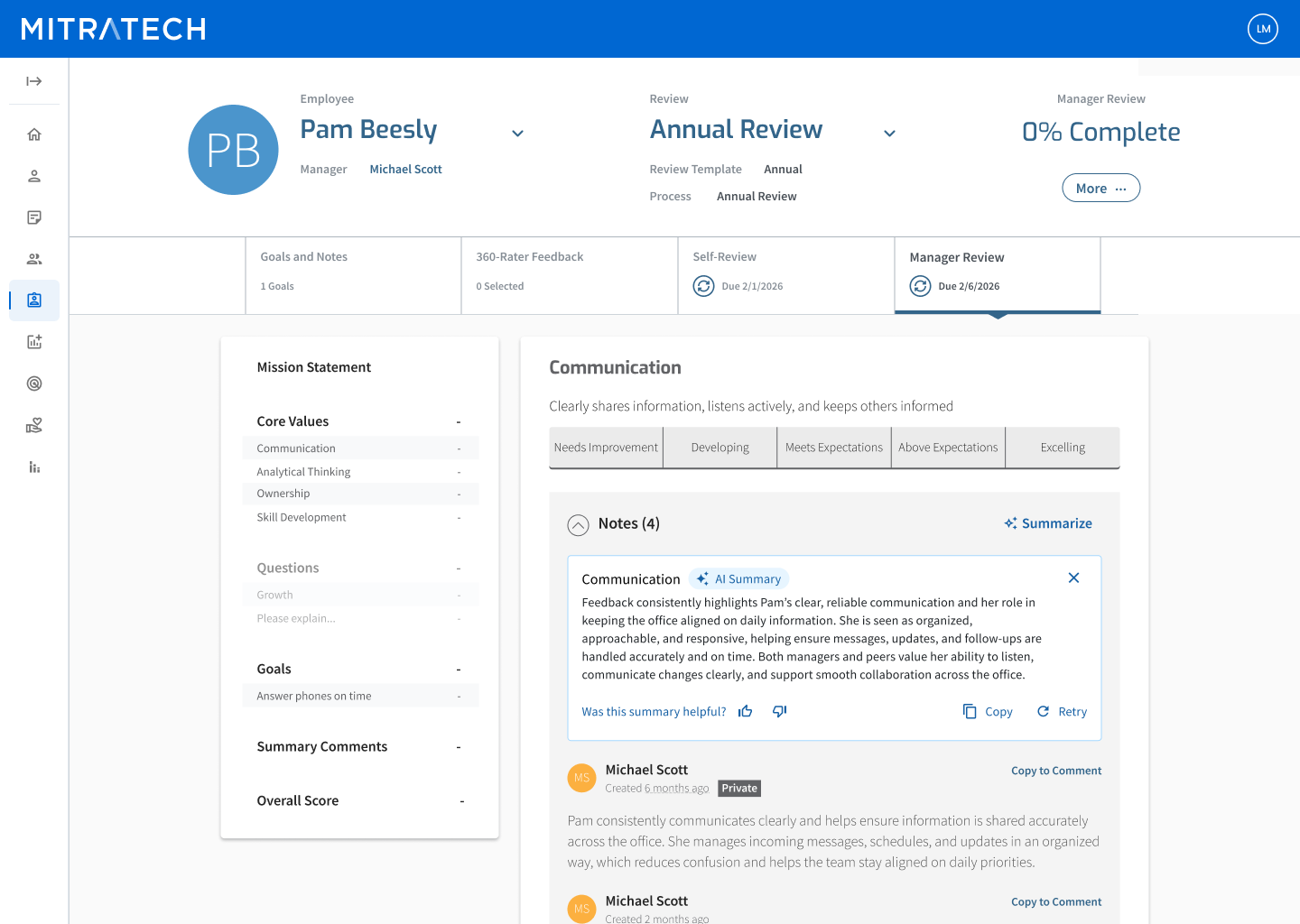
An example of a completed AI summary as it appears in your manager’s review. It draws only from notes already entered — no new opinions are added.
What if I think my summary was inaccurate?
Because the AI summary is based on the notes entered throughout the year, the best way to ensure it reflects your work accurately is to make sure your notes and self-assessments are detailed and up to date before review season.
If the summary doesn't feel representative, try clicking Retry to generate a new version, or use it as a starting point and write your review in your own words.
If you have broader concerns about how your performance was assessed, the right place to raise that is directly with your manager or HR team — the same way you would for any review feedback.
Tips for making the most of it
- Keep your self-assessments specific. The more concrete your notes are, the better they'll be represented in the summary.
- Don't wait until review time. Adding notes throughout the year gives a fuller picture of your contributions than a last-minute entry.
- Use the summary as a starting point, not a final answer. Read it, then write your review in your own voice.
Still have questions?
If you’re unsure about anything related to how AI is used in your review process, your HR team is the best place to start. You can also reach Mitratech Support through the 'Help' Menu in Perform.
FAQ
Q: Will AI write my review? No. The AI summarizes notes that were already collected and does not generate new opinions or invent feedback. You are still responsible for applying your own judgment and writing the actual review.
Q: Is my feedback data used to train AI models? A: No. Notes and review content are never used to train external AI systems.
Q: What should I do if I think my summary was inaccurate? A: Try clicking Retry to generate a new version. If you have concerns about how your performance was assessed more broadly, raise that directly with your manager or HR team. The best way to ensure accuracy is to keep your notes and self-assessments detailed and up to date throughout the year.